Capture Card
Capture Cards solve a very common problem: you have a group of people and need to accurately collect their identity and contact information.
Traditionally, this means asking people to write down their name and email address, fill out a form, hand over a business card, or provide their information to someone who manually enters it into a database. Every one of these approaches introduces opportunities for error. Handwriting can be illegible, email addresses can be mistyped, information can be transcribed incorrectly, and people can deliberately provide false information.
Capture Cards approach the problem through Attested Communication.
Instead of asking someone to enter their identity into another form, AppKeyId uses the identity already associated with that person's AppKeyId account. The user authenticates and acknowledges the Capture Card using their passkey. This provides much stronger assurance that the person joining the group is the authenticated AppKeyId user associated with those credentials.
The result is essentially authenticated contact capture.
How Capture Cards Work
Using a Capture Card begins with a Team. A Team is a collection of AppKeyId users that the Team owner wants to organize as a group.
The author first creates the Team into which new users will be captured and then creates a Capture Card associated with that Team.
Unlike a private Message Card, a Capture Card is public. The author does not need to know in advance who will respond to it. The Card can be distributed as a link, displayed as a QR code, printed on a sign, included in a presentation, or distributed through other media.
Anyone can encounter the Capture Card, but to join the Team they must be an AppKeyId user. When the user authenticates and acknowledges the Card, AppKeyId prompts them to join the associated Team.
Once they accept, their AppKeyId identity becomes part of the Team.
There is no handwritten signup sheet to decipher, no collection of business cards to enter later, and no need to manually transcribe email addresses from one system into another.
Trade Show Lead Capture
A trade show provides a good example.
Instead of placing a clipboard on the booth counter and asking visitors to provide their names and email addresses, an exhibitor can display a large AppKeyId Capture Card QR code.
An interested visitor scans the QR code, signs into AppKeyId if necessary, acknowledges the Capture Card using their passkey, and joins the exhibitor's Team. The exhibitor now has the visitor's AppKeyId identity and contact information captured directly into a reusable group.
There can also be an incentive to participate. Visitors might be entered into a prize drawing at the end of the show or receive an immediate benefit—a cup of coffee, a donut, a promotional item, access to additional information, or some other reward.
The Capture Card effectively turns a QR code into an authenticated lead-capture mechanism.
Parent-Teacher Associations
A Parent-Teacher Association could use the same mechanism to build a group of participating parents.
At the beginning of the school year, the PTA could distribute a Capture Card through a QR code at orientation, display it during a meeting, or include its link in school communications.
Parents acknowledge the Card and join the PTA Team. Instead of maintaining handwritten signup sheets and manually assembling mailing lists, the organization develops its membership list directly from participating AppKeyId users.
Once assembled, that Team can subsequently be used to distribute private AppKeyId Cards to the entire group.
Other Uses for Capture Cards
The same model can be applied anywhere an organization needs to turn an unknown collection of people into an identifiable group.
-
Conferences and Events — Capture attendees interested in a particular speaker, product, workshop, or subject. A QR code displayed at the end of a presentation can allow interested audience members to immediately join a follow-up Team.
-
Professional Associations and Clubs — Enroll members at meetings, conferences, recruiting events, and other gatherings without manually maintaining signup sheets.
-
Volunteer Organizations — Capture people willing to participate in a project, charity event, neighborhood cleanup, food drive, or other activity and immediately organize them into a Team.
-
Schools and Universities — Create Teams for classes, clubs, alumni groups, parent organizations, study groups, and extracurricular activities.
-
Neighborhood and Homeowners Associations — Allow residents to join neighborhood communication groups by scanning a QR code at a meeting or community event.
-
Churches and Community Organizations — Build Teams for programs, committees, activities, volunteer opportunities, and other community groups.
-
Employee Onboarding and Training — Capture employees attending an orientation or training session into a Team that can subsequently receive training materials and other Attested Communications.
-
Product Demonstrations — Allow prospective customers to identify themselves as interested in a product and join a follow-up group immediately after seeing a demonstration.
-
Real Estate Open Houses — Allow interested visitors to join a property-specific Team, providing the agent with a list of authenticated prospects without requiring a handwritten visitor log.
-
Emergency and Incident Response — Assemble a Team of personnel arriving at an incident, staging area, shelter, or temporary work site.
Exporting Captured Leads
The information collected through a Capture Card is not locked inside AppKeyId. The owner can download an Excel-compatible spreadsheet containing the users captured into the Team, together with the appropriate contact information associated with each lead.
The spreadsheet is structured for easy use with other business applications. Captured contacts can be imported into CRM systems, email platforms, marketing databases, event-management systems, spreadsheets, and other third-party applications.
For a trade show, for example, an exhibitor can display a Capture Card throughout the event, automatically collect interested attendees into a Team, and then download the resulting lead list for import into the company's existing sales or CRM system.
This eliminates much of the administrative work traditionally associated with lead capture. There are no handwritten forms to decipher, business cards to transcribe, or email addresses to manually re-enter.
The complete process becomes:
Scan → Authenticate → Acknowledge → Join Team → Export
From Capture to Communication
The real value of a Capture Card extends beyond collecting an email address.
Traditional lead-capture systems generally end with a row in a spreadsheet or CRM database. A Capture Card creates a relationship with an authenticated AppKeyId user and places that user directly into a Team.
That Team can then become the starting point for subsequent Attested Communication. Cards can be distributed to the group, members can acknowledge those communications, and the organization can maintain a continuing relationship with the people it originally captured.
Capture Cards therefore transform the traditional signup sheet into an authenticated, automated, and immediately usable collection of people.
What once required a clipboard, a stack of business cards, manual data entry, and subsequent cleanup can instead begin with something as simple as scanning a QR code.
Creating a Capture Card: Trade Show Leads
The following example demonstrates how to create a Capture Card for collecting leads at a trade show. Anyone who scans the Capture Card's QR code or follows its link can authenticate with AppKeyId, acknowledge the Card, and choose to join the Trade Show Leads Team.
Step 1 — Create the Team
The first step is to create the Team where users captured by the Capture Card will be added.
Open the Teams tab and select Create to create a new Team.
Give the Team the following name:
Trade Show Leads
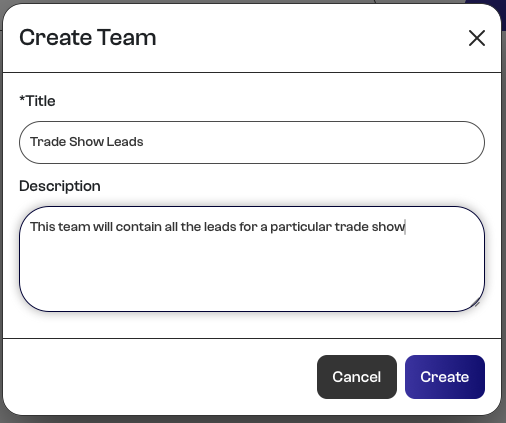
Save the Team. This Team will become the destination for everyone who responds to the Capture Card and agrees to join.
Step 2 — Create the Capture Card
Next, open your Outbox, select Create, and choose Capture as the Card type.
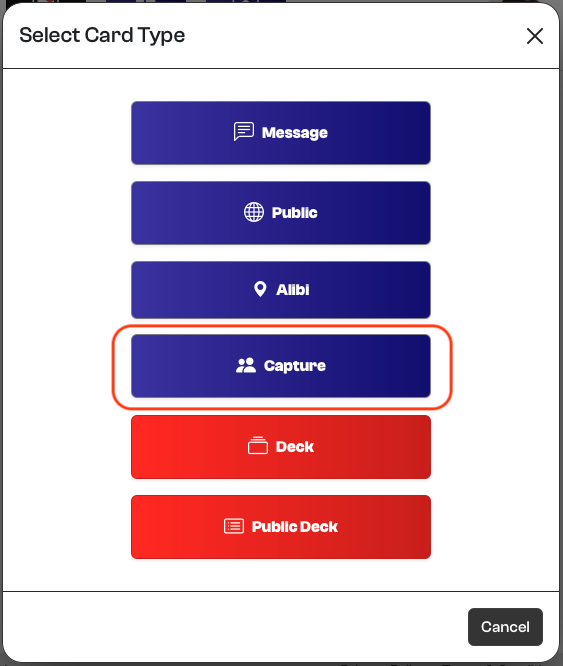
Enter the following title:
Trade Show Leads
Add the appropriate content to the Card. For example:
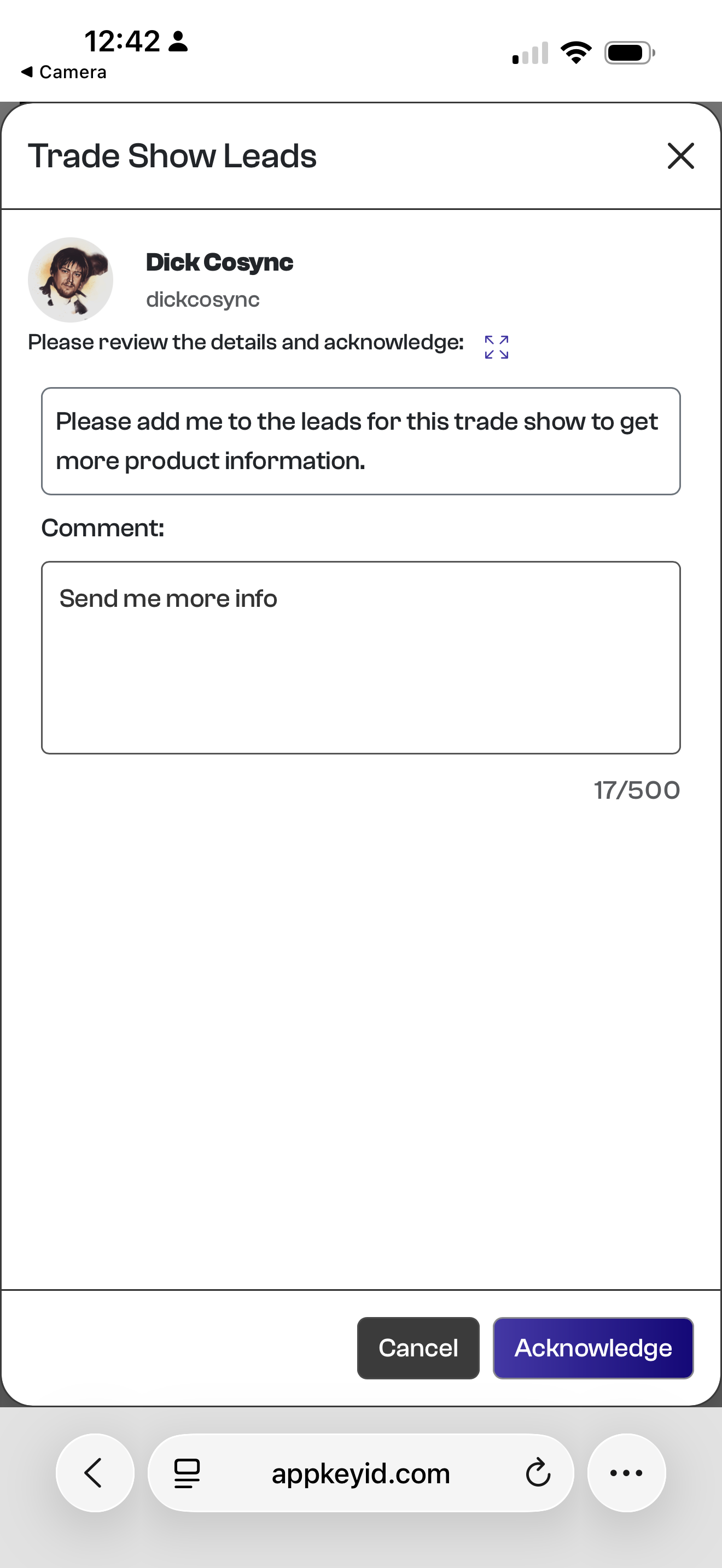
Please add me to the leads for this trade show to get more product information.
Acknowledge this Card to join our Trade Show Leads group and receive additional information about our products and services.
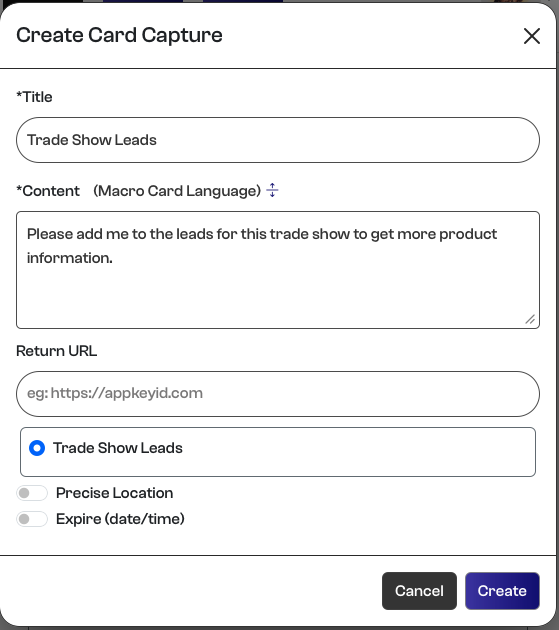
Associate the Capture Card with the Trade Show Leads Team created in Step 1, and then save the Card.
Step 3 — Share the Capture Card
The new Capture Card will now appear in your Outbox.
Expand the Card's QR code to display the QR code and Card link. You can now either send the link directly to another user or have the user scan the QR code with the camera on their mobile phone.
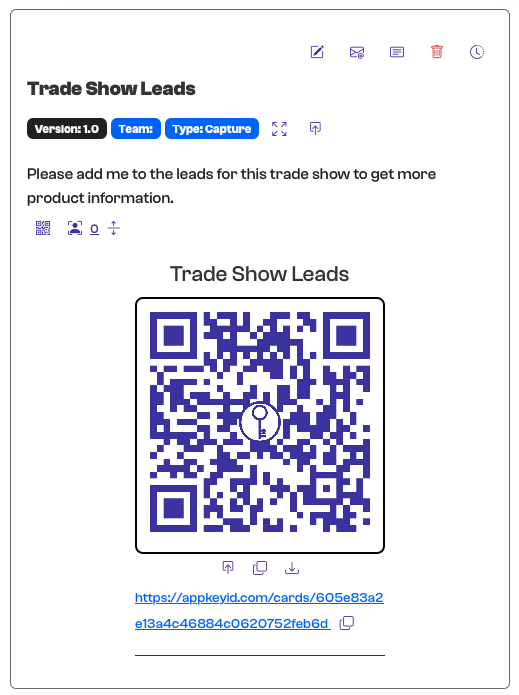
This is particularly useful at a trade show, where the QR code can be displayed prominently at a booth, on a monitor, in printed material, or on a sign.
When the user follows the link or scans the QR code, they are presented with the Capture Card and its acknowledgement form. The user acknowledges the Card using their AppKeyId account and passkey and may also leave an optional comment.
Step 4 — Join the Team
After acknowledging the Capture Card, the user is explicitly asked whether they want to join the Trade Show Leads Team.
The user selects Submit to confirm that they want to join.
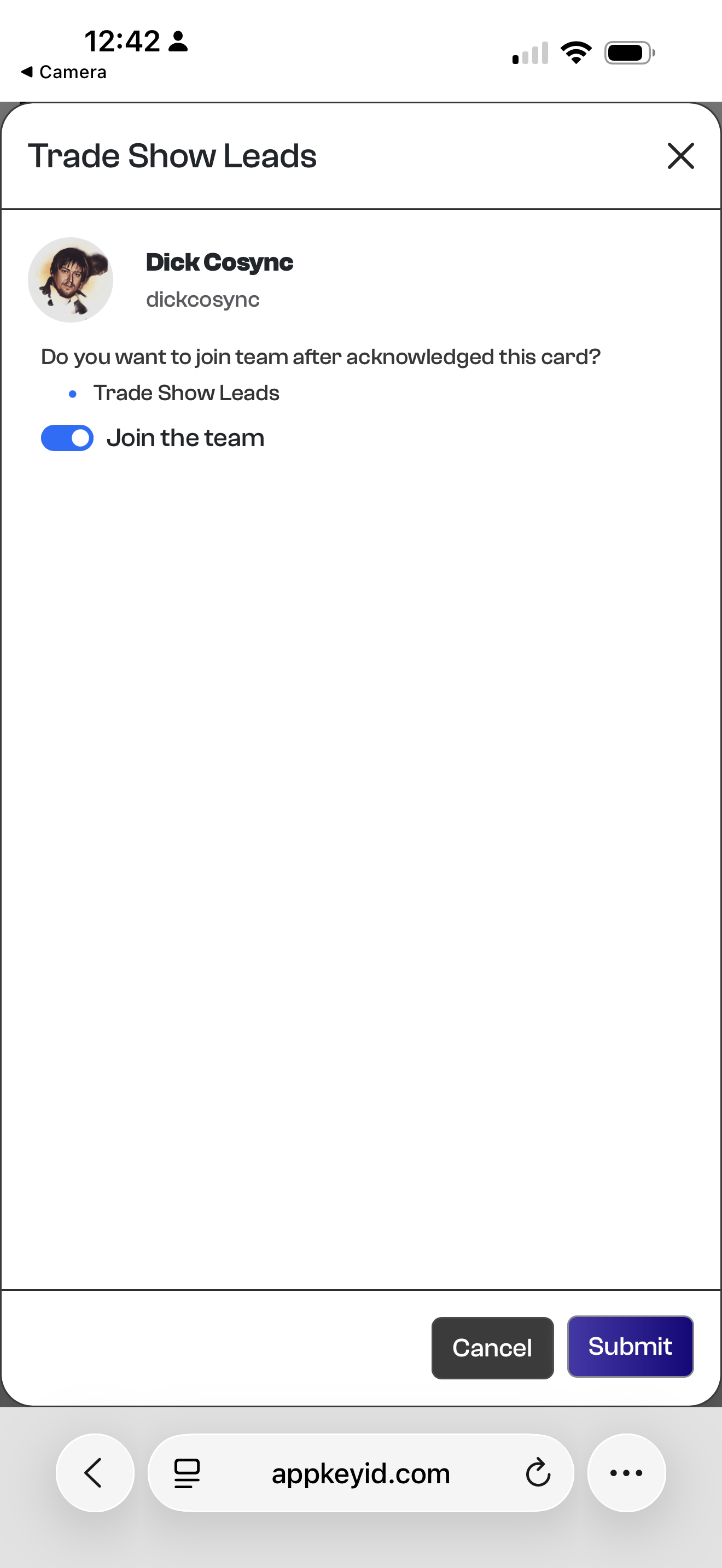
This explicit confirmation is important: scanning the QR code or viewing the Card does not automatically add someone to the Team. The user acknowledges the Card and affirmatively agrees to join.
Step 5 — Verify the Captured User
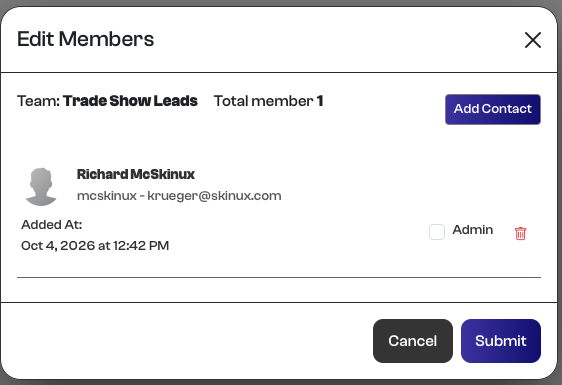
The Card owner can now return to the Teams tab, locate the Trade Show Leads Team, and select Edit Members.
The newly captured user will appear as a member of the Team, together with the contact information associated with their AppKeyId identity.
The Team can continue to grow as additional people scan the same QR code and acknowledge the Capture Card.
That's It
Et voilà! That is how easy it is to create a Capture Card and its associated QR code.
There are no handwritten signup sheets to decipher, business cards to transcribe, or email addresses to manually enter. Each participant supplies their identity through their existing AppKeyId account and acknowledges the Capture Card using their passkey.
The entire process becomes:
Scan → Authenticate → Acknowledge → Agree to Join → Captured
The result is a completely automated form of contact capture based on Attested Communication. Instead of trusting manually entered information, the Card owner receives contact information associated with an authenticated AppKeyId user and a passkey-backed acknowledgement of the interaction.
For a busy trade show booth, a single QR code can therefore replace the clipboard, signup sheet, business-card bowl, and much of the data entry that traditionally follows the event.